An editorial calendar buys you peace of mind because you don’t have to scramble for what to say or share. Ideas are stored and worked on over time rather than in a panic at the last minute.
Wouldn’t it feel great to have ideas lined up for your newsletter or blog for the next six months?
Another big reason to use an editorial calendar is that it helps you remember the important things you want to say. You know ... those things you forget about until immediately after you’ve clicked the Send button?
For example, let’s say you are teaching a workshop six months from now. You would add promotional content to your editorial calendar for the month or two prior to your workshop, and perhaps even before that time if you had an early registration period.
Those are placeholders for the future. When that time comes, you just
The post Why You Need an Editorial Calendar (and How To Make One) appeared first on Art Biz Success.
]]>An editorial calendar buys you peace of mind because you don’t have to scramble for what to say or share. Ideas are stored and worked on over time rather than in a panic at the last minute.

Wouldn’t it feel great to have ideas lined up for your newsletter or blog for the next six months?
Another big reason to use an editorial calendar is that it helps you remember the important things you want to say. You know … those things you forget about until immediately after you’ve clicked the Send button?
For example, let’s say you are teaching a workshop six months from now. You would add promotional content to your editorial calendar for the month or two prior to your workshop, and perhaps even before that time if you had an early registration period.
Those are placeholders for the future. When that time comes, you just open up that file, page, or document and get to work. In the meantime, you are continually adding notes to your ideas.
Newspapers, magazines, and bloggers use editorial calendars to plan their content.
You can do the same by creating an editorial calendar for your newsletter, blog, and social media.

What to Include
When working on your editorial calendar, pull out your big calendar and review your projects, exhibitions, and events.
What do you have coming up?
What could you relate to seasonal or current events?
What do you need to tell people about? Invite them to?
Your editorial calendar includes these five items:
- Topic to be featured (original and curated articles, images, audio, and/or video) – always focused around your art
- Notes about the topic
- Additional people involved or required to make it happen
- Dates of publication
- Deadlines of note
The amount of detail you include depends on your needs.

How to Store Your Calendar
The key to storing your editorial calendar is to make it as user-friendly as possible. If you’re always tweaking the format or refreshing your memory on how it’s organized, your calendar isn’t working for you.
Keep. It. Simple.
I always caution my students and clients not to try fixing something that isn’t broken. If you love pen and paper, I wouldn’t take that away from you. But make sure you have a storage system for your ideas that makes it easy to find.
I have tried using a spreadsheet in Numbers (Apple’s version of Excel) and keeping my plan in a FileMaker Pro database. Neither worked for me, but that doesn’t mean they wouldn’t work for you.
I eventually settled upon using Evernote for my editorial calendar, where I can add to the ideas as I research or discover information that might contribute to the article.
Your Turn
Tell us about your editorial calendar, or the one you wish you had.
The post Why You Need an Editorial Calendar (and How To Make One) appeared first on Art Biz Success.
]]>The post Revitalize Old Content On Your Blog appeared first on Art Biz Success.
]]>In the early years, I posted a lot of little snippets before Facebook and Twitter were the place for these. That means there’s a lot of crap on my blog. (I won’t link to it here because it’s going away, as you’ll see.)
If you’ve had a blog for a while, you might be faced with the same dilemma: What to do about old posts that have outlived their usefulness?

I started looking for posts that would either 1) embarrass me if someone landed on them or 2) lead readers astray with dead links or outdated information.
You can follow my revitalization process if you think it might serve you.
First, Review Google Analytics
What are your high-performing posts? While you can measure post performance in numerous ways, I’m using number of visits in this process.
After looking over Google Analytics, I narrowed down my focus to the 25 most-visited posts over the last year. That doesn’t mean they were published in the last year. In fact, only 6 of the 25 were from 2014; none were from 2013. This is from a pool of more than 2500 posts.
You might have to consider a longer period of time, depending on your publishing rate. Because I publish at least weekly, one year of Analytics results gave me a pretty good selection to consider.
Here’s what you can do after you’ve determined your top post performers.
Next, Clean Up the Mess
Go through your top posts one by one, looking at the following.
Review the links.
- Delete irrelevant links (out-of-date events, calls to actions that are in the past).
- Add links to new products, services, or outside resources if they would be helpful to your readers.
Spruce up the images.
-
Image location is lost for this old post. Are all images still visible? Sometimes image files are lost or accidentally deleted over time. For example, many images didn’t make the trip from my old TypePad blog to WordPress back in 2010. It didn’t look too spiffy to have an image credit without the image!
- Are the image links still live and pointing to relevant pages?
- Is there a featured image for all posts that have images? This is used in WordPress themes for multi-post pages and might go by a different label on other platforms.
- Resize images that are too small (check out those below – egad!). Your goal is to take up the width of the column to create impact.
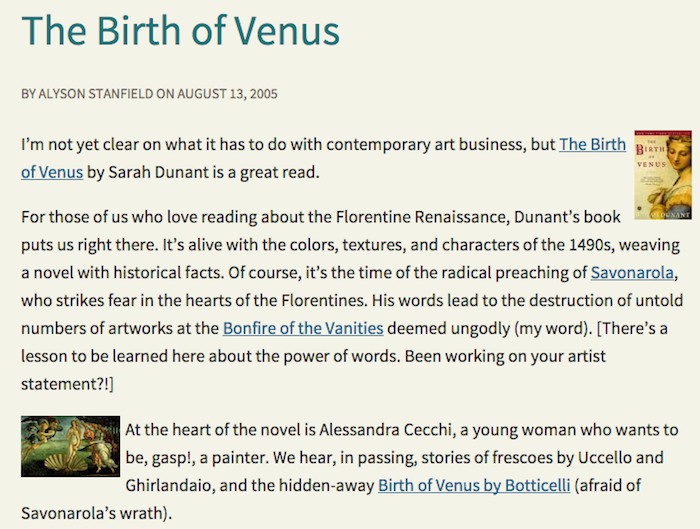
- Add images to posts that don’t have them. Make them large enough to look good on Facebook and make them vertical whenever possible so that they shine on Pinterest.
This is the part that takes the longest because I want them to be easily shared.
- Add Alt Text to images. This is what shows up in the description when someone pins your images to Pinterest.
To see what your current pinned images look like, go to this Web page: http://pinterest.com/source/yourwebsiteURL For example, mine would be http://pinterest.com/source/artbizcoach.com. (I was shocked to see the lame Alt Text I had used with many of my images!)
Delete irrelevant posts.
There’s some debate as to whether or not old posts should be deleted. Purists say they should remain as a record of your blog. I disagree.
If it’s content that is out-of-date and would lead readers astray, I feel like I have an obligation to delete those posts in order to avoid any confusion on my site. I cannot see the harm in deleting a post about a workshop that happened in 2007.
I still have a long way to go with my blog revitalization project, but I am certain it will result in a better looking and more useful resource.
The post Revitalize Old Content On Your Blog appeared first on Art Biz Success.
]]>The post 9 Artist Resources for Better Performing Websites and Blogs appeared first on Art Biz Success.
]]>I thought it might be helpful if, from time to time, I curated some topics for you.
Today’s post brings together a bunch of articles to help with the look and functionality of your website or blog.
Free Articles
31 Types of Photographs You Can Use to Promote Your Art
Just what it sounds like: a compilation of ideas that should keep you snapping pictures for years to come.
Includes 8 different ways you can photograph your art, 9 pictures to take of your office, 7 studio shots, and 8 mugs of you.
11 Fast Website or Blog Fixes
If your website or blog has been under-performing, there’s no need to take drastic measures like creating an entirely new site. Consider these 11 tweaks to give your online presence a boost.
Create a Style Sheet for Your Website or Blog
Is your online presence as consistent and professional as it could be? A style sheet could save you.
Being consistent with your colors, font styles, and font sizes will keep your site in order and save you time because you won’t have to think about what to use. You have established rules.
Remix Images of Your Art for a Fresh Look
This post is for you if you are tired of traditional art categories or if your art doesn’t make sense in those categories.
It might also be helpful for anyone who just wants a change.
Placing Older Art on Your Website
If I had to write this post again, I’d call it “Earlier Art,” which is a much more appropriate name for it. But whatever you call it, earlier art presents a dilemma for artists.
You don’t want it to overshadow your new work, but you do want to be able to share it with people who might be interested. I have some ideas for you in this article.
Strategic E-Marketing: Connecting the Components
I can’t tell you how many times I visit an artist’s site and can’t find their Twitter link. Or even a link to their blog!
Or I’ll visit their Facebook profile and wonder why it isn’t linked to their business page on Facebook.
Make it easy for people to find you – wherever they first land!
Personalize Your Error Pages
This is a little touch that can go a long way for your readers and visitors.
When they land on a page that you’ve moved or deleted, tell them you understand how frustrating it is to get a big Error on a page. Try to make it right, and then give them options for staying on your site.
Audio Program
I called on Pat Velte, my Web guru, for Website Makeover for Artists.
We talked about what artists are doing wrong on their sites and how you can fix the errors. (Most are easy and completely free!)
Click here to learn more about this audio program and transcript.
 Self-Study
Writing coach Cynthia Morris tackled the stuff she’s good at (writing!) and I handled blog functionality and appearance in our Blog Triage Self-Study.
20 detailed lessons in audio and PDF files. Plenty to keep you improving your blog for weeks. Read the details here.
These two programs are no longer for sale.
The post 9 Artist Resources for Better Performing Websites and Blogs appeared first on Art Biz Success.
]]>The post If Your Blog And Website Are Separate appeared first on Art Biz Success.
]]>It was a last-minute decision, but a big Duh moment. . . . We used the same navigation menu for each site.
Here’s the Art Biz Coach site/menu:

And here’s the Art Biz Blog site/menu:

The only difference is the logo. Otherwise, visitors feel like they’re on the same site.
This is a game changer for me. It’s a solution for something that’s been bugging me for years.
It’s The Result Of Being an Early(ish) Blogger
The reason that Art Biz Coach and Art Biz Blog were separate in the first place is because I started the blog on a different blogging platform based on the best advice I had at that time.
If I had known better, I’d have done what I encourage all of my clients to do: build a WordPress site that integrates a blog with static pages. There is no reason to have a blog separate from a website.
I switched the blog to WordPress a few years ago, but the two sites still remained separate and I’ve always struggled with this.
Now they are both on WordPress (two different installations), but they look much more cohesive. As a bonus, I’ll get more people seeing my programs and products because of the new navigation menu on the blog.
I’m sure WordPress makes this easier to do than if you have an HTML site and a Blogger site. It’s also easier if you have an amazing Web guru like Pat Velte helping you.
Even if you can’t model this solution, I implore you to add a BLOG link to your website in your main navigation menu – even if it takes people to a new site and window. You’ll get more clicks on your blog link than on many other items in your menu because people expect to find new/fresh content there.
Make it easy for people to find your blog!
The post If Your Blog And Website Are Separate appeared first on Art Biz Success.
]]>The post Why Am I Blogging On A Tuesday? appeared first on Art Biz Success.
]]>
My reasoning was this:
- I don’t need to post every day. Period. That’s too much stress.
- Mondays are pretty good traffic days. Everyone is getting back to work.
- Wednesday is when the Art Biz Insider newsletter comes out and I need the corresponding blog post published simultaneously. You should subscribe here if you don’t already.
- I like to have a post featured for at least a couple of days, so Deep Thought Thursday wasn’t working well for me since it meant my Wednesday post would be at top for just 24 hours.
- A Friday post could get extra weekend traffic and tie me over until Monday. So I dropped the “Thursday” and moved Deep Thoughts to Fridays without much notice.
Why Am I Posting On Tuesday?
1
I’m writing on a Tuesday because I missed yesterday’s post.
I am lousy with Monday posts. I’ve been liking time off on weekends more and more. And I haven’t been good at writing posts early and in batches, as Cynthia Morris recommends in our fabulous audio program Stress-Free Blogging. (It really is stress-free if you DO the work.)
If I can’t post on Monday, I’ll have to post on Tuesday.
I Might Change My Mind
As you’ll find out in tomorrow’s post (stick around!) I like to test and tweak things. Constantly. And you should, too.
The world changes and you change. You have to pay attention to what works and what doesn’t work.
Be wary of rigid schedules – especially if they’re not working.
Marcus Sheridan at The Sales Lion writes, “When I hear brand new bloggers talk about set posting schedules I can’t help but to crack a little smile, especially for the ones that think they’re going to post every day.”
I feel the same. Every time an artist tells me they’re going to reboot their flailing blog with daily posts, I challenge their commitment. “Why don’t you start with just a weekly post and then see what develops?” They seem greatly relieved. Why apply all of that unnecessary pressure?
Sheridan further offers this advice (summarized/edited here):
- Allow your schedule to change.
- Do not set a blogging schedule just because someone else told you it was a good idea.
- There is no truth in the statement , ‘XYZ niche bloggers should post at least X times per week’.
- Have some fun, will ya?!!
I love #4. If you don’t enjoy it, you won’t be any good at it.
Do you have a blogging schedule? How has it worked for you? How has it evolved?
The post Why Am I Blogging On A Tuesday? appeared first on Art Biz Success.
]]>The post Essential WordPress Plugins for Artists: Showing Off Your Art appeared first on Art Biz Success.
]]>This is the third and final post in my Essential WordPress Plugins for Artists series for Art Biz Blog. The first one was on Security and the second focused on Search Engine Optimization.
I saved my all time favorite plugin for the final installation of my top choices for WordPress plugins: NextGEN Gallery. There is so much that you can do with NextGEN Gallery, the least of which is managing and organizing your work into separate distinct galleries.
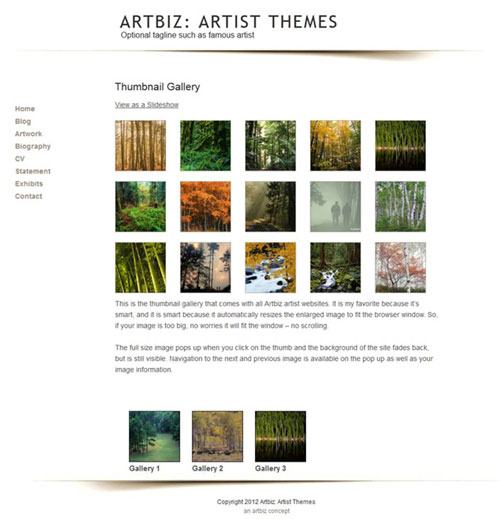
For large bodies of work or yearly archives you can group your portfolio using albums. Any number of galleries can be added to an album, which is available in two formats: 1) the compact version with only a thumbnail representing the galleries inside or 2) the expanded version, which has a description of the galleries inside.
You can easily upload batches of images via a standard WordPress-style uploader, zip file, or FTP. NextGEN automatically imports your images’ meta data and completes the image description and title boxes for you – IF you add the meta data to your images using photo-editing software before uploading.
NextGEN Gallery allows you to do more than the default WordPress gallery, including:
- Copy or move images between galleries
- Create multiple albums to organize galleries
- Chose the size of your thumbnails and whether or not to maintain the aspect ratio
- Crop a new thumbnail if the head is cut of your figure painting
- Change the size of your thumbnails
- Add alternative text and titles for your images
- Tag images
- Add html to your descriptions
- Exclude image from showing on your site without having to delete it
- Insert single images via the WordPress insert media button
- Rotate images
- Resize images (in pixel size only, this is not an optimizing tool like Photoshop) – I share how to do this in my SEO for Artists and Resizing Images (in Photoshop) tutorials
- Reorder images by drag and drop
- Watermark images
- Back up the original image upon upload and restore it later if need be
- Paginate gallery images
NextGen displays your images in a lightbox or a slideshow format and lets site visitors toggle between the two. There are 2 lightbox type effects that come with NextGen; Thickbox (my fav) or Shutter.
“Thickbox” is an effect that opens the larger image on a screen overlay, graying out the background, but making it visible enough that people know they are still on your site. It opens full size on a large screen, but adjusts to fit smaller screens as well. Brilliant! No scrolling!
Best of all, NextGEN teamed up with WordPress SEO plugin by Yoast to enable sitemap generation for NextGen images. This means that the images in NextGEN Gallery are indexed by the search engines if you use WordPress SEO plugin.
Organizing images is one of the most daunting tasks for artists. NextGEN Gallery makes image management a whole lot less stressful.
What’s your experience with image management on WordPress?
About Our Guest Blogger
Kim Bruce is a working artist who runs Artbiz, where she creates websites for artists. She also teaches how to watermark images with NextGen Gallery at The WordPress for Artists School. Kim works out of her office/studio located in the foothills of Alberta just outside of Calgary.
The post Essential WordPress Plugins for Artists: Showing Off Your Art appeared first on Art Biz Success.
]]>The post Essential WordPress Plugins for Artists: Search Engine Optimization appeared first on Art Biz Success.
]]>SEO: Search Engine Optimization. I can hear your sighs.
There are only two things you need to remember when writing good content and making it SEO friendly: 1) your focus keyword and 2) your meta description.

Let’s define these.
- Focus Keyword. Keywords are what people type into the search engines in order to find your site. It is good practice and adds weight to your credibility (in the eyes of search engines) if you focus on one main keyword per page/post.
- Meta Description. The meta description is 160 characters of text that describes what the post is about. It often appears in the search engine results and can influence people to click through to your site.
WordPress SEO by Yoast is my plugin of choice for search engine optimization. Though it appears complex, you can use it straight out of the box (as installed).
If you do use it out of the box, then you must fill in the SEO form that is available under the editor of every page and post of your site. If you’d like to avoid this process, take the time to fill in the general meta description template available under the Home tab of the plugin.
I use this plugin because it guides and rates SEO for every page. It will tell you if you missed something or pluralized your keyword (which results in a red instead of green rating).
Another reason I like WordPress SEO is that it inserts the meta title and meta description higher up in your Head source code, which makes it readily available for the search engines to find and index.

If you don’t use an SEO plugin at all the search engines are going to create their own meta description using the first 160 characters from your post.
What blogger doesn’t want to control what potential visitors read in search engine results? Taking the time to craft your general meta description in the plugins template might be the clincher that encourages click-throughs to your site.
Kim Bruce is a working artist who runs Artbiz, where she creates websites for artists. She also teaches how to watermark images with NextGen Gallery at The WordPress for Artists School. Kim works out of her office/studio located in the foothills of Alberta just outside of Calgary.
The post Essential WordPress Plugins for Artists: Search Engine Optimization appeared first on Art Biz Success.
]]>The post Essential WordPress Plugins for Artists: Security appeared first on Art Biz Success.
]]>Hackers are finding the open doors in WordPress and unless you know how to close these doors and batten down the hatches your site is vulnerable to attack. It is just a matter of time until you’re hacked. Artist Frances Clements Fawcett shares in this blog post how it happened to her and how stressful was.

I recommend two security plugins. The first will educate you on what you need to do. The second will scan your site on demand.
1. Ultimate Security Checker
Ultimate Security Checker will scan your current installation of WordPress and tell you where and how to fix the problems. Read the entire list and what to do if your site gets hacked.
2. Sucuri Scanner
Sucuri Scanner scans your site for malware on demand. With just a few clicks you can harden – close the doors – the leaks that hackers look for in a WordPress installation. Make sure you harden your site again when updating to the newest version of WordPress.
Notice I said scan “on demand.”
Don’t be fooled into thinking that you can run either one of these plugins once, follow the directions, and you are done. You’re not! WordPress is always developing and the only thing consistent about the Internet is that it changes.
Make it part of your login routine to scan your WordPress site with Sucuri every time you log in to your dashboard. It only takes a few minutes and can save you the hours or days of grief that Frances had to endure.
I suggest using these two plugins in combination. First manually harden with the Ultimate Security Checker and then scan ongoing with Surcuri Scanner.
Kim Bruce is a working artist who runs Artbiz, where she creates websites for artists. She also teaches how to watermark images with NextGen Gallery at The WordPress for Artists School. Kim works out of her office/studio located in the foothills of Alberta just outside of Calgary.
The post Essential WordPress Plugins for Artists: Security appeared first on Art Biz Success.
]]>The post Coordinating Your Marketing Efforts appeared first on Art Biz Success.
]]>Website, blog, newsletter, email, Instagram, Facebook, Twitter, LinkedIn, YouTube, TikTok, Pinterest. The list just keeps exploding.
How do you keep up with it all?
The answer is: You can’t!
Don’t even try.
The trick is to admit defeat. To let go of the platforms that aren’t serving you or that just feel like no fun.
Here’s a rundown of 3 basic platforms you should be using to promote your art and how they work with one another. Facebook is optional, but recommended. The other two are mandatory.
Blog or Website
Your artist website is your home base, your brand, your everything. You can’t neglect your site!
Use might use your site to brand yourself as an expert. You might be an expert on your subject matter, an expert on your media, or an expert on local artists. In those instances, you probably need a blog.
Or you might just be an expert on you.
It’s critical that you do this on your site and not on a social media site owned by a big company. It’s the only way you can control your message and ensure that it endures.
Tips for coordinating your site with other marketing platforms:
- Use your site to collect email addresses through a sign-up form.
- Make sure your social media links are easy to find.
- Install “Share” buttons to blog posts so that visitors can share your content quickly on social media sites.
- Create Pinterest boards for your top blog posts and thematic groupings of your art.
Some people will connect with you through your blog or social media, but you can’t count on that. You can’t control those algorithms.
Email, whether in the form of short reminders or newsletters, is vital for keeping your name in front of people. Send email messages to announce exhibitions and classes, send invitations, and broadcast reminders.
Tips for coordinating your email with other marketing platforms:
- Revise content from your blog or social media updates for email newsletters.
- Use email to drive people to your website or blog, but don’t send them to your home page. Home pages are boring! Send them to the page with your hot-out-of-the-studio art or your most-commented-on blog post.
- Provide links to your social profiles in your email newsletters and encourage people to follow you.
Facebook or Instagram
Remember that most people will see your updates as they appear in news feeds—not from your timeline or profile page. It’s rare that people (unless they’re spending way too much time on the computer) who saw an update of yours at 8 a.m. would see another one at 4 p.m.
Tips for coordinating your social profiles with other marketing platforms:
- Make sure the link to your website or blog appears in your profiles. People should be able to quickly find the link and visit your site.
- See that your Facebook business page shows up as your employer on your personal profile. (IOW, that your business page is your employer.)
- Consider making custom posts in the native apps rather than cross-posting the same message across diverse platforms.
- Every now and then, post an invitation to subscribe to your email newsletter.
That’s it! website/blog, email, and social media, although this is by no means a comprehensive list of how you can coordinate these marketing tools.
I know what you’re asking now: Where’s Twitter? Why not Pinterest? What about YouTube?
We could go on and on. If you like these additional platforms, use them! They’re all good. They can all be worthwhile if used consistently and with respect for their unique qualities.
But . . . Coordinate your marketing efforts. Your various profiles, sites, and platforms do not stand by themselves. You must use them in harmony in order to be effective with your message.
How are you coordinating your marketing?
The post Coordinating Your Marketing Efforts appeared first on Art Biz Success.
]]>The post 9 Things You May Not Know About The Art Biz Blog appeared first on Art Biz Success.
]]> The Art Biz Blog consistently ranks near the top of art blogs on Alltop, but one fine day last spring, I had 4 of the top 5 posts on the site!
The post 9 Things You May Not Know About The Art Biz Blog appeared first on Art Biz Success.
]]>